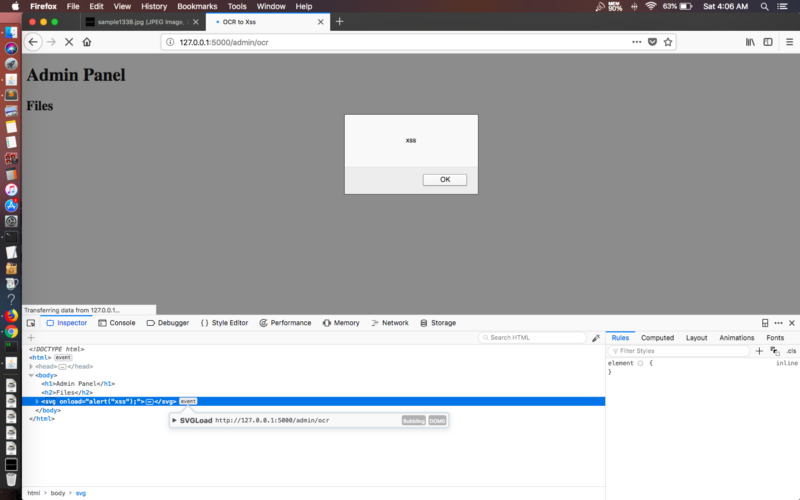
Optical Character Recognition (OCR) is the process of electronically extracting text from images or documents like PDFs, and reusing it in a variety of ways such as full-text search, invoice processing, and document verification. This becomes a security issue when the extracted text is reflected back into an application without validation.
If an application parses an image and reflects the extracted text to a user, embedding an XSS vector as text inside that image can lead to XSS.
Proof of Concept
Take a simple JPG containing an XSS payload as text. You can create an image like that here.
This PoC uses tesseract for OCR, along with a simple Flask server that accepts an image as input, parses it, and reflects the extracted content back to an admin or another user. The server code is available here.
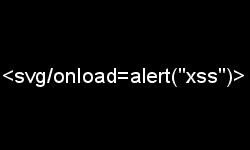
Steps to reproduce:
- Start the server:
python ocr.py - Visit the local server at
127.0.0.1:5000 - Upload the image above
- Visit
/admin/ocr/files - The XSS payload fires

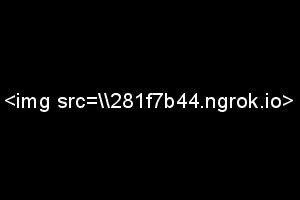
Similarly, you can create an image containing a blind XSS payload to confirm a pingback to a server you control.
Note: different OCR parsers handle certain characters differently. Tesseract, for example, treats a forward slash ("/") as the letter "L", so
http://becomeshttp:/l, which won't resolve correctly in a browser. Using backslashes works around this for Tesseract; other parsers may need their own workaround.
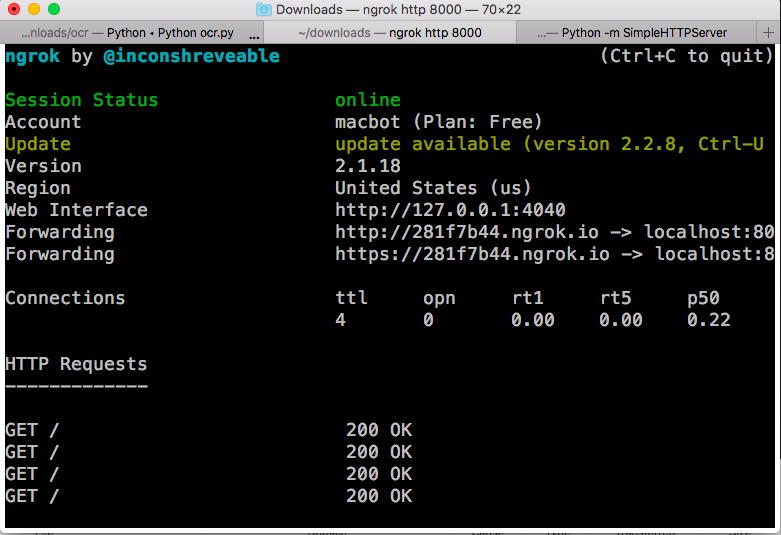
I used ngrok here just to confirm the ping. Burp Collaborator or any similar out-of-band tool works just as well. Create an image with this content, upload it, and check whether you get a hit.
Response
Fix
If you're using OCR services, don't just sanitize the filename. Sanitize the extracted text pulled from the image or PDF before it's stored in the database or reflected back to a user.
After uploading an image, check whether its contents are reflected anywhere in the response. If so, and there's no validation on how that extracted text is displayed, it can lead to XSS, particularly in applications using OCR for KYC, document verification, or scanned-document uploads.
So next time an application asks you to upload a scanned document, a passport photo, or anything else for verification, it's worth testing how that OCR pipeline handles what it extracts.